1Step 1
Add QuizAce to Chrome
One click from the Chrome Web Store, sign in with Google. No setup, no credit card. Ready in 30 seconds.
Loading...
QuizAce is the AI quiz solver that reads every question on your screen and fills in the correct answer when you double-click it. No tab switching, no copy-paste — the answer lands right in the quiz.
Which organelle produces most of the cell's ATP?
Select all functions of the liver.
Match the macromolecule to its monomer.
Install once. From then on, every quiz on Canvas, Moodle, Blackboard or Google Forms is one shortcut and a double-click away.
One click from the Chrome Web Store, sign in with Google. No setup, no credit card. Ready in 30 seconds.
QuizAce instantly reads every question on the page — text, images, diagrams and formulas — and picks the best AI model for the subject.
Which organelle produces most ATP?
The correct answer is selected, typed or matched right in the quiz. Skip the ones you already know, double-click the rest.
This is exactly what QuizAce does on your quiz page. Double-click a question and watch the answer fill in.
Which of the following elements is a noble gas?
Select all the early signs of dehydration in an adult patient.
Which organelle is shown in this electron micrograph?
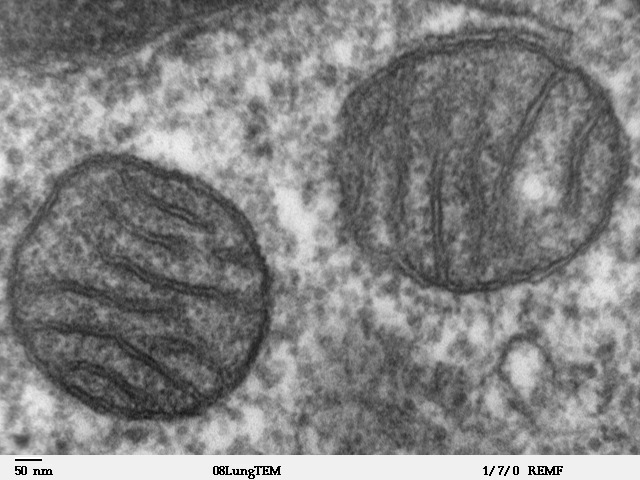 Fig. 2 · TEMImage read
Match each protocol with what it does.
QuizAce works inside the quiz page, in a normal Chrome window — no setup on the platform side.
Click a platform to watch the video
Is your platform on the list? Try QuizAce on your own quiz.
5 free answers a day · no credit card required
Platforms work in a standard Chrome window. We don't guarantee operation inside embedded views (iframe, webview) or lockdown browsers.
All logos and trademarks belong to their respective owners. Their inclusion does not imply any official endorsement or affiliation.
QuizAce sends each question to the AI model best suited to it — pictures and medical questions get their own — then fills the answer the way you would, so the platform saves and grades it normally.
Graded
end to end by Canvas, Moodle and Google Forms themselves
one press65 / 65 filled
65
questions on one page, all filled from one press
~4 s
to read the whole page; each double-click then fills at once
20
interface languages tested, answers in the quiz's language
Real reviews from the Chrome Web Store.
“I press the shortcut when the quiz opens and just double-click as I go. My Canvas quizzes take ten minutes instead of forty.”
“Matching and dropdown questions actually work, which no other extension managed on our Moodle. And nothing shows on screen.”
“It read a diagram question with a figure of the heart and got it right. I checked the explanation and it made sense.”
Start free. Upgrade when you need more.
Unlimited answers for 24 hours. One payment, nothing renews.
$2.99for 24 hours
Get the 24-hour passBuilt for a busy week
Cancel anytime
$155.88 $89.99 billed once a year
Free plan: 5 answers a day on every platform, no credit card. Full refund within 48 hours on any Pro plan.
Through the quiz's own buttons and fields, exactly as if you clicked or typed them yourself, so every answer is saved like any other. No tab, panel or window opens: you stay on your quiz.
No. Lockdown browsers replace Chrome and switch off every extension. QuizAce works in a standard Chrome window on Canvas, Moodle, Blackboard, Brightspace, Google Forms and Microsoft Forms.
Canvas (Classic and New Quizzes), Moodle (quiz, lesson, H5P), Blackboard Ultra, Google Forms, Brightspace and Microsoft Forms. Multiple choice, multiple answers, true/false, matching, dropdowns, fill-in-the-blank, numeric, formula, ordering, categorization, word bank, essays and picture questions.
Every platform is tested end to end with a quiz holding every question type, answered by the live AI and graded by the platform itself: every auto-graded item right on Canvas, 46/48 on Moodle, 30/32 on Google Forms. Hard questions can still go wrong, so you choose what gets filled.
ChatGPT lives in another tab: you copy the question, paste it, read the answer, come back and click. QuizAce reads the whole quiz page at once — pictures and formulas included — and fills the correct answer in place when you double-click. No tab switching, no copy-paste.
You stay in control: QuizAce only fills the questions you double-click. If an answer looks off, skip it or change it like any other answer before you submit.
Yes. The free plan gives you 5 answers a day on every platform, no credit card. Need more for one day? The 24-hour pass is $2.99, no subscription. Unlimited plans start at $6.99 for a week, and every Pro plan has a full 48-hour refund.
5.0 Chrome Web Store
Add QuizAce to Chrome, open your quiz, press the shortcut and double-click. That's the whole workflow.
Which organelle produces most of the cell's ATP?