1Step 1
Add QuizAce to Chrome
One click from the Chrome Web Store, sign in with Google. No setup, no credit card. Ready in 30 seconds.
Loading...
QuizAce reads every question on your Canvas quiz, Classic or New Quizzes, and fills in the answer when you double-click it. No tab switching, no copy-paste.
Which organelle produces most of the cell's ATP?
Select all functions of the liver.
Match the macromolecule to its monomer.
Install once. Then every Canvas quiz, Classic or New Quizzes, is one shortcut and a double-click away.
One click from the Chrome Web Store, sign in with Google. No setup, no credit card. Ready in 30 seconds.
QuizAce instantly reads every question on the page — text, images, diagrams and formulas — and picks the best AI model for the subject.
Which organelle produces most ATP?
The correct answer is selected, typed or matched right in the quiz. Skip the ones you already know, double-click the rest.
This is exactly what QuizAce does on your quiz page. Double-click a question and watch the answer fill in.
Which of the following elements is a noble gas?
Select all the early signs of dehydration in an adult patient.
Which organelle is shown in this electron micrograph?
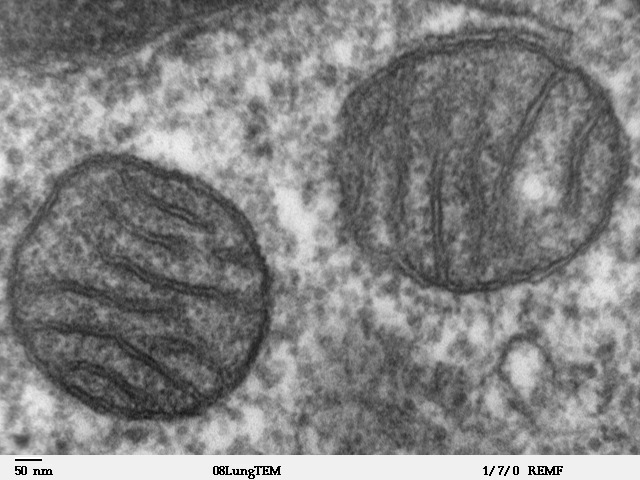 Fig. 2 · TEMImage read
Match each protocol with what it does.
Tested on Classic Quizzes and New Quizzes with every question type Canvas offers.
Question types
Tested on Canvas
Start free. Upgrade when you need more.
Unlimited answers for 24 hours. One payment, nothing renews.
$2.99for 24 hours
Get the 24-hour passBuilt for a busy week
Cancel anytime
$155.88 $89.99 billed once a year
Free plan: 5 answers a day on every platform, no credit card. Full refund within 48 hours on any Pro plan.
Yes. QuizAce works on Classic Quizzes and New Quizzes, including when New Quizzes opens inside its own frame, which is how most schools show it.
Multiple choice, multiple answers, true/false, matching, multiple dropdowns, fill in the blank (text, dropdown and word bank), numerical, formula, ordering, categorization, hot spot and essays, with pictures, equations and LaTeX read as part of the question. File uploads are left to you.
Yes. Each question is read when it appears. If you go back to a question QuizAce already solved, a double-click fills it again without a new request.
No. QuizAce reads the quiz page already open in your Chrome tab. You never share your Canvas password and nothing is installed on Canvas.
Add QuizAce to Chrome and sign in with Google. Open your quiz, press Ctrl+Shift+X (Cmd+Shift+X on a Mac), then double-click each question you want answered: the answer is filled in place.
Yes. You get 5 free answers a day on every platform, no credit card. Need more for one day? The 24-hour pass is $2.99, no subscription. Unlimited plans start at $6.99 for a week, with a full refund within 48 hours.
5.0 Chrome Web Store
Add QuizAce to Chrome, open your quiz, press the shortcut and double-click. That's the whole workflow.
Which organelle produces most of the cell's ATP?